
Ishin Codes and Redemption Help
Check the current list of reported Ishin codes, copy a code, and follow the game's menu path to redeem it.
Use the current list to check an Ishin code's reported reward before trying it. The copy button copies the code itself; paste only the code into the game's entry field, never the reward text or dates.
Current Ishin codes
Ishin codes and rewards
Requires joining the developer's Roblox group (luure) before codes can be redeemed.
How to redeem3KTHANKSSource checked:
HALLOSource checked:
PETSSource checked:
restartSource checked:
SOSORRYSource checked:
WATERSource checked:
| Code (click to copy) | Rewards | Status | Source checked |
|---|---|---|---|
3KTHANKS | 45 Rerolls | Reported active | |
HALLO | 65 Rerolls | Reported active | |
PETS | 12,500 Yen | Reported active | |
restart | 40 Rerolls | Reported active | |
SOSORRY | 40 Rerolls | Reported active | |
WATER | 5,000 Yen | Reported active |
Code list at a glance
The reported Ishin codes award either Rerolls or Yen. Rerolls are used during and after character creation to roll fighting styles and appearance, while Yen buys clothes, furniture and other customization for your living space, so a code is useful to almost any player.
How to redeem codes in Ishin
Ishin codes are redeemed from the main menu, and the game requires joining the developer's Roblox group (luure) first — the codes panel displays a group message and will not claim a reward without that membership.
- Join the developer's Roblox group (luure).
- Launch Ishin and create or select a character so you have spawned into the world.
- Open the main menu with the Tab key on keyboard, the menu button on controller, or the three-line menu icon on mobile.
- Select the Codes option at the bottom of the menu list.
- Enter the code into the text box, exactly as written.
- Claim the reward and check your in-game balance.
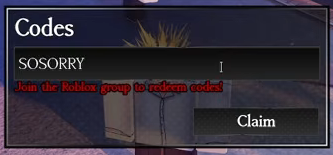
There is no dedicated codes button where you spawn, which is why the menu option is easy to miss.
If a code does not work
- Join the developer's Roblox group first; without membership the game refuses to redeem codes.
- Check spelling, capitalization and punctuation — guides report Ishin codes as case-sensitive, and some include symbols.
- Remove extra spaces introduced when pasting.
- Some rewards are limited to one claim per account; a reply saying a code was already claimed means that account has used it before.
- If a newly shared code fails, leaving and rejoining the server before retrying is a common player suggestion, and the code may simply have expired since it was posted.
- Keep the exact error message when a problem continues; a general report that a reward is missing does not identify the cause.
Status and check dates
Reported status comes from a source listing; Tested means a completed in-game redemption is documented. The source-check date shown beside each code is separate from an in-game test and from any reported expiry. A missing expiry date does not mean a code lasts forever. Use the reward and conditions shown on the particular record you try.
Expired Ishin codes
Expired code archive
GGSource checked:
RELEASE!Source checked:
WEBACKSource checked:
ripscytheSource checked:
| Code (click to copy) | Rewards | Status | Source checked |
|---|---|---|---|
GG | 35 Rerolls | Reported expired | |
RELEASE! | 50 Rerolls | Reported expired | |
WEBACK | 15,000 Yen | Reported expired | |
ripscythe | 35 Rerolls | Reported expired |
Expired entries keep the rewards they reportedly granted while they were active. Start with the current list when looking for a reward; archived codes do not return to the current list until a source lists them as working again.
Code sources
Sources and check records
Reported statuses reflect source listings. Tested statuses reflect in-game redemption checks. Source-check dates are shown beside each code.
- Ishin Roblox Wiki
3KTHANKS· Source checked:HALLO· Source checked:PETS· Source checked:restart· Source checked:SOSORRY· Source checked:WATER· Source checked:
- GamesRadar+
3KTHANKS· Source checked:HALLO· Source checked:PETS· Source checked:restart· Source checked:SOSORRY· Source checked:WATER· Source checked:GG· Source checked:RELEASE!· Source checked:WEBACK· Source checked:ripscythe· Source checked:
- Pro Game Guides
3KTHANKS· Source checked:HALLO· Source checked:PETS· Source checked:restart· Source checked:SOSORRY· Source checked:WATER· Source checked:GG· Source checked:RELEASE!· Source checked:WEBACK· Source checked:ripscythe· Source checked:
- Wukeer
3KTHANKS· Source checked:HALLO· Source checked:PETS· Source checked:restart· Source checked:SOSORRY· Source checked:WATER· Source checked:
- Destructoid
HALLO· Source checked:PETS· Source checked:restart· Source checked:SOSORRY· Source checked:WATER· Source checked:
- urgametips
GG· Source checked:RELEASE!· Source checked:WEBACK· Source checked: